HANDS-ON TOOL REVIEW · PRODUCT VIDEO
Crreo AI Review: Is It Good for Product Video Ads?
A hands-on Crreo AI review of its long-form Video Maker and image-to-video Clip Maker, tested with one owned ecommerce product reference.
Crreo worked better as a one-shot image animator than as a product-grounded ad workflow. It made a playable five-second clip from our product image, but it did not extract product facts or build a reviewable multi-shot ad around them.
TEST METHOD
One owned product, two separate Crreo workflows.
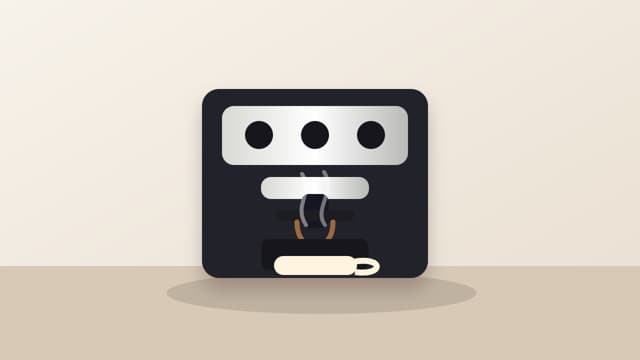
We used an unbranded coffee-machine image owned by AdverForge and tested Crreo on October 5-6, 2026. We did not use a competitor demo, trademarked product page or third-party video. The goal was not to find the prettiest frame. It was to see whether the workflow could preserve one submitted product and turn verified information into a usable ad.
Owned reference image
The white machine, three controls, cup area and visible proportions formed the identity check.
No invented facts
No logo, model number, price, specification, testimonial or unsupported feature was allowed.
Full Video Maker
We tested idea-to-script-to-storyboard planning and stopped before paid-quality clip generation when grounding failed.
Video Clip Maker
We uploaded the same image, generated a five-second 16:9 clip and played the output end to end.
WORKFLOW A · LONG-FORM VIDEO
The Full Video Maker planned a story, but not around the submitted product.
Crreo's public site positions this workflow around turning an idea or script into scenes, visuals, voice and music. In our free-account test, it accepted an idea or full script and let us choose orientation, style, voice and media preferences. The script and storyboard step consumed 20% of the one-time allowance.
The generated storyboard introduced unsupported wording and two black coffee machines that did not match the white source product or each other. We found no product-image binding control for those scenes. The visible photo upload belonged to Crreo's consistent-character workflow, not product grounding.
- What worked
- Script generation, storyboard visibility, scene order and manual copy editing.
- What failed
- The planned scenes were not anchored to the supplied product identity.
- Why we stopped
- Generating clips would have converted an already ungrounded storyboard into more expensive output.
WORKFLOW B · IMAGE TO VIDEO
The Video Clip Maker produced a recognizable five-second product shot.
The separate Clip Maker accepted the product image after an awkward upload flow: the macOS file dialog kept the Open button disabled until Show Options was expanded, then the image entered a Verifying state. We waited until the product appeared in Scene Preview before generating.
We selected horizontal 16:9, five seconds and Kine 3.2 at 720p. The interface estimated 10-30 seconds; our run took approximately 90-120 seconds. Usage moved from 0% to 10%. The finished clip opened and played through to 0:05.
Narrow motion, locked identity
The prompt did the claim and identity control manually; Crreo did not infer those boundaries from a product page.
Slow cinematic push-in on the same compact white countertop coffee machine. Keep the product shape, color, controls, proportions, and visible details unchanged. Add only subtle natural reflections and gentle steam near the cup area. No people, no new text, no logo, no model number, no altered controls, no invented features.The machine remained recognizable, including the white body and three circular controls. However, the result softened details and introduced small changes around the cup, lower body and proportions. We would treat it as a candidate micro-shot that still needs product QA, not as a finished advertisement.
PRODUCT-AD SCORECARD
Judge the workflow by product evidence, not by novelty.
- Product input · 1 / 2
- Clip Maker accepted an image. We found no product URL or structured product extraction.
- Product identity · 1 / 2
- The machine stayed recognizable, with softening and small drift around the cup and lower body.
- Ad structure · 0 / 2
- The output was one motion shot, not a hook, proof and close sequence.
- Shot review · 0 / 2
- The path showed a scene preview and final clip, not an editable multi-shot plan.
- Claim safety · 2 / 2
- Our manually constrained prompt produced no visible invented claim. This was not default product grounding.
- Output readiness · 1 / 2
- The result could serve as a reviewed micro-shot, not a complete product ad.
BUYING DECISION
Choose Crreo for creator-led assembly; choose a product workflow for evidence-led ads.
Long-form creator videos
Use it when the main job is assembling a script, scenes, generated visuals, voice and music into longer creator content.
Single image-to-video shots
Use Clip Maker when you already have a suitable product image and can write and review a narrow motion prompt yourself.
Facts before footage
Use a product-grounded workflow when product-page evidence, claim limits and the exact item must shape the plan before generation.
Review before spending
Use it when a team needs to approve hook, proof and closing shots separately before calling a video model.
For the underlying consistency method, read the reference-image product video guide. For reusable shot instructions, use the product consistency prompt templates.
CRREO AI FAQ
Questions to answer before choosing the workflow.
Is Crreo AI useful for ecommerce product videos?
It can create a short motion clip from a product image. In our test, the product remained recognizable but some details drifted. The separate long-form workflow did not bind the supplied product to its storyboard.
Does Crreo accept a product URL?
We did not find product-page extraction in either tested workflow. The Clip Maker accepted an image, while the long-form Video Maker began from an idea or script.
Can Crreo create a complete product ad from one image?
The tested Clip Maker produced one five-second motion shot, not a complete hook, proof and closing sequence. A user would still need to plan claims, shot order, copy and final assembly.
What should teams check before using a generated clip?
Compare the output with the original product evidence. Check silhouette, controls, accessories, materials, product state and every visible or spoken claim before publishing.
Product features and plan limits can change. Check the Crreo website, Clip Maker and current pricing page before making a purchase decision.