AI AD MAKER FOR ECOMMERCE VIDEO ADS
AI ad maker for ecommerce video ads.
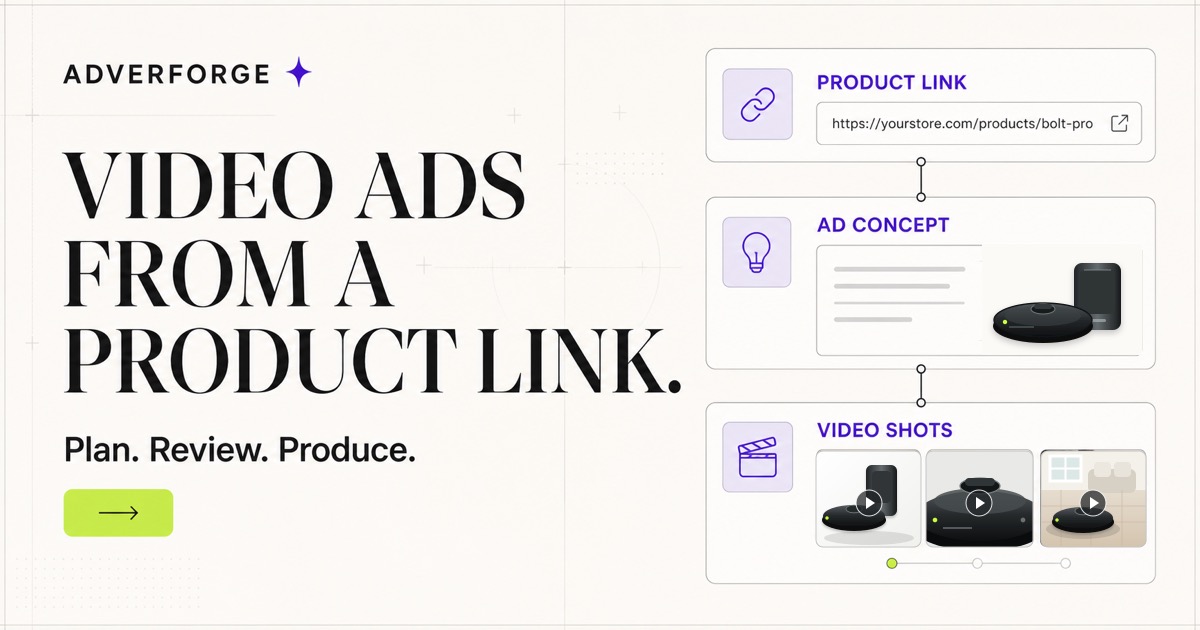
AdverForge is an AI ad maker for ecommerce teams that need product video ads, not another blank prompt box. Paste a product link, preview product-grounded ad ideas, see the shot structure and move the reviewed direction into video production when it is ready.
No product link ready?
Already ready to try the studio?Create account first
PRODUCT LINK TO VIDEO ADAI AD MAKER
Start with the product page
Paste a public ecommerce URL so the ad maker can read the product name, category clues and usable visual references before any video production decision is made.
Preview ad ideas in context
Compare product-grounded hooks, proof-led angles and social video structures without writing a blank prompt or guessing what the model should understand.
Move approved creative into Studio
Save the direction, choose the reference image and review the shot plan in Studio before credits are used for a formal video task.
VIDEO-FIRST AD CREATIVE
Judge the video output before opening Studio.
These QA-passed clips show the two things AdverForge optimizes for: a clear product in the first second and a short ad beat that does not rely on model-generated text.
HOOK SAMPLE
Robot vacuum stop-scroll hook
A product-led opening that keeps the robot vacuum and dock visible while the scene creates the first reason to watch.
HookProduct first, no slow empty setup.ProofOne practical use cue keeps the claim visible.CloseStable product frame for thumbnail and recall.
DETAIL SAMPLE
Wireless earbuds detail reveal
A wearable electronics sample that moves from a complete product view into controlled detail shots while preserving the submitted design.
HookThe full earbuds set appears before the detail move.ProofCase shape and earbud details stay tied to the same product.CloseThe complete set returns as the memory frame.
MOMENT SAMPLE
Coffee machine product moment
A warmer ecommerce sample that gives the product a use moment without adding unsupported performance claims, text overlays or branding.
HookThe coffee machine is clear as the product.ProofThe motion stays centered on product use.CloseThe same machine remains visible at the end.
QA-passed samplesUnbranded product referencesNo generated prices, logos or captions
BUILT FOR PRODUCT-LED TEAMS
An AI ad maker that stays close to ecommerce evidence.
Many ad tools ask a marketer to describe the product from memory. That creates generic creative and makes review harder because the ad direction is separated from the product page, images and proof material.
AdverForge keeps the product source, creative direction and production decision in one workflow. The goal is simple: help ecommerce teams move faster without losing control over what the ad says or shows.
WHAT YOU CAN EXPECT
From ecommerce product context to reviewable video ad creative.
The first result should help you judge whether the product was understood. The final production step stays separate, explicit and reviewable.
Product link instead of empty prompt
The workflow begins with product-owned information, so your first ad idea is anchored in what is actually being sold.
Reusable structures for ecommerce ads
Each direction starts from a creative playbook such as product reveal, visible proof, problem answer or product-owned metaphor.
Review before production
The public preview does not spend credits. Studio is where the product, category, evidence and shot plan are confirmed.
Short video ads for social testing
AdverForge is built around short-form product videos for paid social, launch pages and catalog creative, not static banner generation.
ECOMMERCE USE CASES
Use an AI ad maker where product context matters.
AdverForge is narrow by design: it is for ecommerce product video ad planning, production review and repeatable campaign work.
Turn product pages into launch-ready video ideas
Use a product URL to create an initial ad direction for new products, seasonal drops or refreshed landing pages.
Plan creative before spending on production
Review which hook, shot order and proof angle is worth producing before sending a task into video generation.
Keep repeat ecommerce briefs consistent
Create a repeatable flow for client product links, campaign assets and approved video directions across multiple accounts.
AI AD MAKER FAQ
How AdverForge turns product links into ecommerce video ad ideas.
Is AdverForge an AI ad maker or a video generator?
It is an AI ad maker focused on ecommerce video ads. The public page helps you preview product-grounded ad ideas, while Studio handles the reviewed video production workflow.
Can it generate ads from a product link?
Yes. Paste a product page URL to preview the product identity, category and safe starting directions on the page before opening Studio.
Does the AI ad maker create banner ads?
No. AdverForge is positioned around ecommerce video ad creative, including hooks, shot plans and short social video production.
Do I need to create an account before seeing anything?
No. The public preview is designed to show a useful product read first. An account is needed when you want to save the result and continue in Studio.
When are credits used?
Credits are not used for the lightweight on-page preview. Credits are tied to a formal video production task after the product, evidence and direction have been reviewed.
Why does product grounding matter?
Product grounding keeps the creative close to the item, its images and its supported claims. That lowers the risk of generic ads or unsupported product promises.
Who is this page for?
It is for ecommerce operators, DTC teams and agencies that need product video ad ideas from real product pages rather than broad prompt-writing tools.
Can I edit the direction before making the video?
Yes. Studio lets you choose the product reference, adjust the creative direction and review the shot plan before production starts.